Hi everyone,
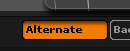
I sorry because probably that’s a very dumb question but I can’t figure out how to make a custom button with press state, like this:
I’m trying to make a shorter version of ‘Enable Spotlight Projection’ button and I’ve tried:
[IButton,“ZPlugin:My Buttons:Test”,“Enable Spotlight Projection”,
[IShowActions,0][If,[IGet,Brush:Samples:Spotlight Projection] == 0,
[INDENT=2][IPress,ZPlugin:My Buttons:Test]
[INDENT=2][IPress,Brush:Samples:Spotlight Projection]
,//else set to zero
[INDENT=2][IUnPress,ZPlugin:My Buttons:Test]
[INDENT=2][IUnPress,Brush:Samples:Spotlight Projection]
]
]
and
[IButton,“ZPlugin:My Buttons:Test”,“Enable Spotlight Projection”,
[IShowActions,0][If,[IGet,Brush:Samples:Spotlight Projection] == 0,
[INDENT=2][IToggle,ZPlugin:My Buttons:Test]
[INDENT=2][IPress,Brush:Samples:Spotlight Projection]
,//else set to zero
[INDENT=2][IToggle,ZPlugin:My Buttons:Test]
[INDENT=2][IUnPress,Brush:Samples:Spotlight Projection]
]
]
but is stays in the same unpressed state. Can you please point me what I’m doing wrong?
Many thanks!
Attachments